How to Trade Bitcoin on XXKK: Step-by-Step Guide
How to Trade Bitcoin on XXKK: Step-by-Step Guide
Learn how to trade Bitcoin on XXKK, choose a trading pair, compare market and limit orders, place your first trade, and check order status.
Quick Answer: If you want to trade Bitcoin on XXKK, you should log in to your account, pick a BTC trading pair that is available, decide on a market or limit order, enter the amount you wish to trade and then check the details before submitting the order. You can look at your order history to make sure that your order has been filled. Key Takeaways: Learn how to set up your XXKK account and fund it before you start trading. Learn how to check the Bitcoin trading pair and the relevant fees. Find out how market orders favour execution, whereas limit orders provide price control. Understand how to check your order status in order to verify whether the trade is open, only partially filled or has been completed. Begin with a trade size that is manageable and get a clear understanding of the risks before raising it. To get started with bitcoin trading you need to make some simple choices: which market to use, how much to trade and what kind of order matches your requirements. For those who are new to cryptocurrencies, becoming familiar with these steps will enable you to place your orders more confidently and allow you to keep record of your trades after they have been executed. This step by step guide deals with the process of trading bitcoin on XXKK, starting with how to get your account set up and ending with checking if your order has been executed. Before you begin, make sure you have the following: An XXKK account: Visit the XXKK website to get started. Account verification: Complete your KYC verification steps required for your account by selecting your country of residence and choose the type of ID you want to use either your National ID or Passport. Available funds: Make sure your account has the crypto asset needed for your chosen trading pair. In most cases USDT, USDC and other stablecoins. Basic market knowledge: Understand how market orders, limit orders, trading fees, and price movements works. Check the applicable fees, deposit methods, withdrawal conditions and minimum order requirements for your account before trading. In case you are new to crypto markets, read XXKK Academy's What Is Cryptocurrency Spot Trading? Complete Beginners Guide before placing your first order. After setting up your account, go to XXKK Markets and find a Bitcoin trading pair that is available. A trading pair indicates the asset you are buying or selling and other methods you use to value the transaction. For instance, BTC/USDT means that Bitcoin is priced in USDT. If you buy this pair you are using USDT to buy BTC and if you sell it you are exchanging BTC for USDT. Before selecting a pair, check: The current market price. The orders currently available for buying and selling. The trading fee information. The kinds of orders that are supported by that market. Please take a moment to check the order form and make sure that the pair, the direction (whether to buy or sell), the order type and the quantity, are all correct before doing anything. The type of order you choose determine how your trade will be carried out. A market order is one which seeks to carry out the transaction against the available orders at the best prices that are currently available; while execution is given top priority, there is no guarantee as to the final price. In a market that is moving rapidly or one with a thin order book, the price at which the order is executed could be different from the price you originally saw. A limit order enables you to specify the highest price you are willing to pay when you are buying or the lowest price you are willing to accept when you are selling. Limit order gives you greater control over the price, but the order may stay unfulfilled if the market does not reach your specified limit. What kind of order should a beginner choose? In situations where it is important to have price control a limit order is useful; whereas a market order would be appropriate in the case where execution is the main concern and the available liquidity has already been examined. Both types of order leave trading risk. It is essential to understand the conditions of the order before moving on. To place your first Bitcoin order on XXKK, follow these simple steps by steps: Create your account. Signup or Sign in to your XXKK account and make sure the required funds are available. Select your trading pair. Find BTC and choose the available pair that matches the asset you want to use. Available pair on XXKK is BTC/USDT pair. Choose buy or sell. Select Buy if you want to purchase Bitcoin or Sell if you want to sell Bitcoin you already hold. Select the order type. Choose market order or limit order based on your execution needs. Enter the quantity. Specify the amount of Bitcoin you want to trade or enter the order value. Review the details. Check the order value, price, fees and any other information shown. Submit the order. Confirm only after checking every field. Submitting an order doesn't mean that the trade has been completed. If you want to check its status, you should look in the trading interface for a section labelled Open Orders, Order History, or Trade History. Common order statuses include: Open order: Means the order is ready to be executed. Partly filled: This means some of the amount has been traded, while the rest is still awaiting trade. Filled: The order has been completely carried out. Canceled: This means cancellation has been carried out regarding the remaining amount that was not filled. If the limit order is still open, look at the current market price and then decide whether to keep the order, alter it or cancel it, if such options are available. Make sure that you check the updated order details before carrying out any changes. When you want to close a Bitcoin position you usually sell the BTC that you are holding. Before confirming the sell order you should check the amount and the expected amount of money you will receive. However, if you are dealing with derivatives the rules for closing a position are different and there are extra risks involved. When new traders are starting out in the trade they often make mistakes which are entirely avoidable when learning how to buy Bitcoin. Ignoring Trading Fees: If you are ignoring the fees, they will have an effect on the total cost of buying and selling. It is important to check the relevant fee schedule before placing your order. Incorrect order type selected: When placing a trade, ensure your choice of order is correct before you submit. A market order focuses on ensuring execution, whereas a limit order is used to set the maximum price you are willing to pay. Trading a large amount at one time: Bitcoin prices are liable to fluctuate. If you hold a big position you might suffer losses that go beyond your comfort level. Not checking the status of an order: an open order does not mean a completed trade. Always verify the final status of your trade and the quantity that has been executed. Reacting emotionally to changes in price: The best traders dont react to emotion, do not alter your trading plan just because the market moves sharply. You must have decided on your entry point, your exit point and your acceptable loss before you commit any funds. Before you can trade Bitcoin on XXKK exchange, you first need to set up your account, choose the correct trading pair, understand market and limit orders and check all your orders before submitting them. After your order has been placed, you should keep an eye on its status and make sure that the amount that has been executed is confirmed. Before increasing the size of your trade, make sure you understand the fees and the risks. You need to set up an account, carry out the necessary setup to secure your account, fund it by using one of the available methods, pick a Bitcoin trading pair, select the type of order, enter the amount and then check over the details before submitting it; after that, check the status of your order. You need to have an XXKK account, carry out any necessary verification, ensure that you have the required funds for the market you want to trade in, and understand the different order types and trading fees. The requirements will differ from one region to another. With a limit order you can control the price at which you will accept a trade, though it may not in fact be carried out; a market order stresses the completion of the order but does not guarantee a specific price. You must select the type of order depending on your needs and the market conditions. From the order or trade history section. Check the order status and the quantity that has been executed. If an order has been filled then it has been executed in full, but if it is only partially filled there will still be a remainder of quantity that needs to be executed.How to Trade Bitcoin on XXKK: A Step-by-Step Guide
 Source: XXKK Homepage
What You Need Before Your First Bitcoin Trade
Choosing a Bitcoin Pair and Reading the Order Form
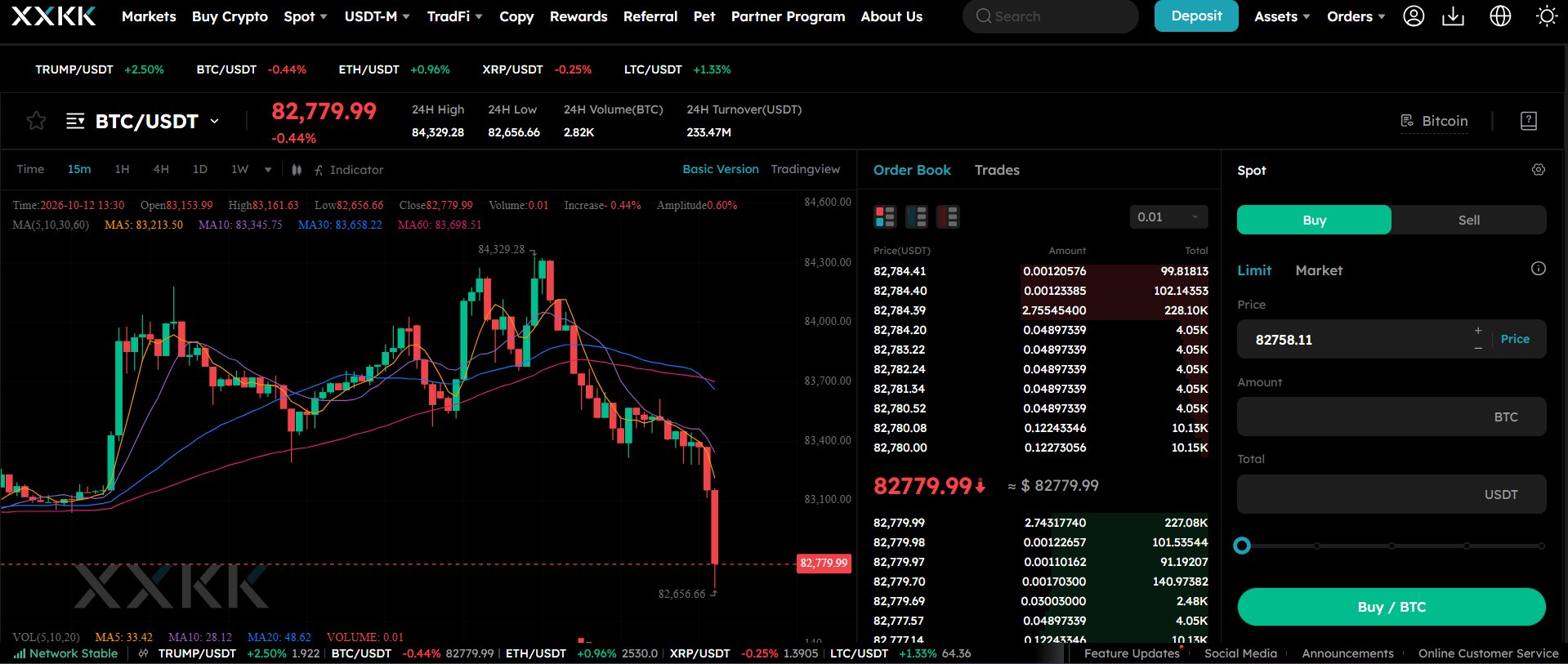 Source: XXKK BTC/USDT Trading Pairs
Market Order or Limit Order: Which to Use?
Placing a Bitcoin Order Step by Step
Tracking, Editing, and Closing a Bitcoin Position
Common Beginner Mistakes When Trading Bitcoin
Conclusion
FAQs
How do I trade Bitcoin on XXKK?
What do I need before I can trade Bitcoin?
Which order type should a beginner use?
How do I check whether my order was filled?
