Best Candlestick Colors for Trading: A Readable Setup
Best Candlestick Colors for Trading: A Readable Setup
The best candlestick colors for trading are the ones you can read at a glance. See how to pick up and down colors, hollow bodies, and wick contrast.
Quick Answer
The best candlestick colors for trading are contrasting colors that make rising and falling price movements easy to identify. Green and red are common choices, while teal and orange or blue and magenta offer alternatives. Check wick visibility, background contrast, and saved layout settings.
Key Takeaways:
-
How to choose contrasting colors for rising and falling candles.
-
Understand ways to test your palette against the chart background and gridlines.
-
Hollow and filled candle styles vary by platform.
-
Learn how to check wick and border visibility, especially when using hollow candles.
-
Understand how to save your chart layout and check device settings if colors reset.
A good trading chart should allow you to easily understand price movements. If the candles' colors blend with the background or are too similar to each other, it becomes more difficult than it should be to read the price action.
When it comes to choosing the best candlestick colors for trading, the emphasis should not be placed on discovering an ideal color combination but should instead be on making it easy to distinguish between rising and falling prices; a clear setup also reduces visual clutter and makes it easier to examine charts at different timeframes.
What Makes a Chart Readable
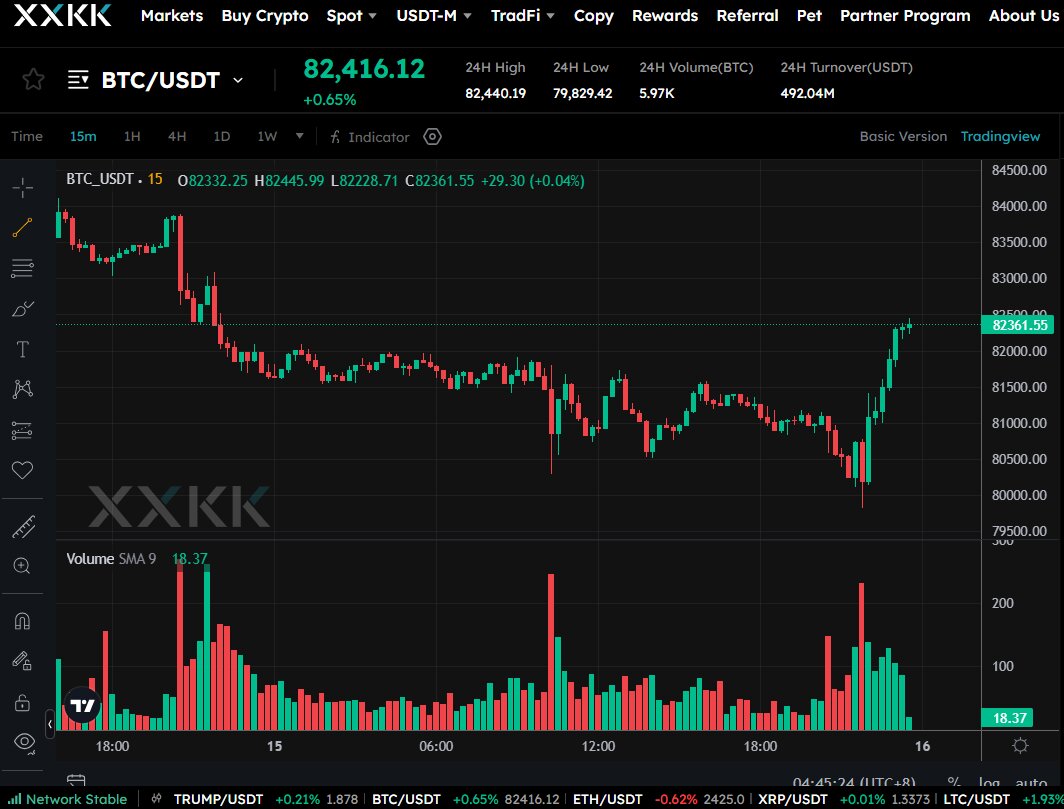
Source: XXKK BTC/USDT Chart
If you'd like a rapid overview of how candles are constructed, you can look at the XXKK Academy section entitled Candlestick Chart Basics.
A useful color setup should meet three basic requirements:
-
It is obvious that candles appearing to go up are different from candles appearing to go down when you look at them at a first glance.
-
There should be a strong contrast so that the candle bodies and wicks are visible against the background of the chart.
-
It is important that the same colors indicate the same direction regardless of the timeframes being used.
While green and red are frequently used, they are by no means required; the best candle colors are those which you can easily and comfortably identify over extended periods when looking at charts.
How to Choose Up and Down Colours
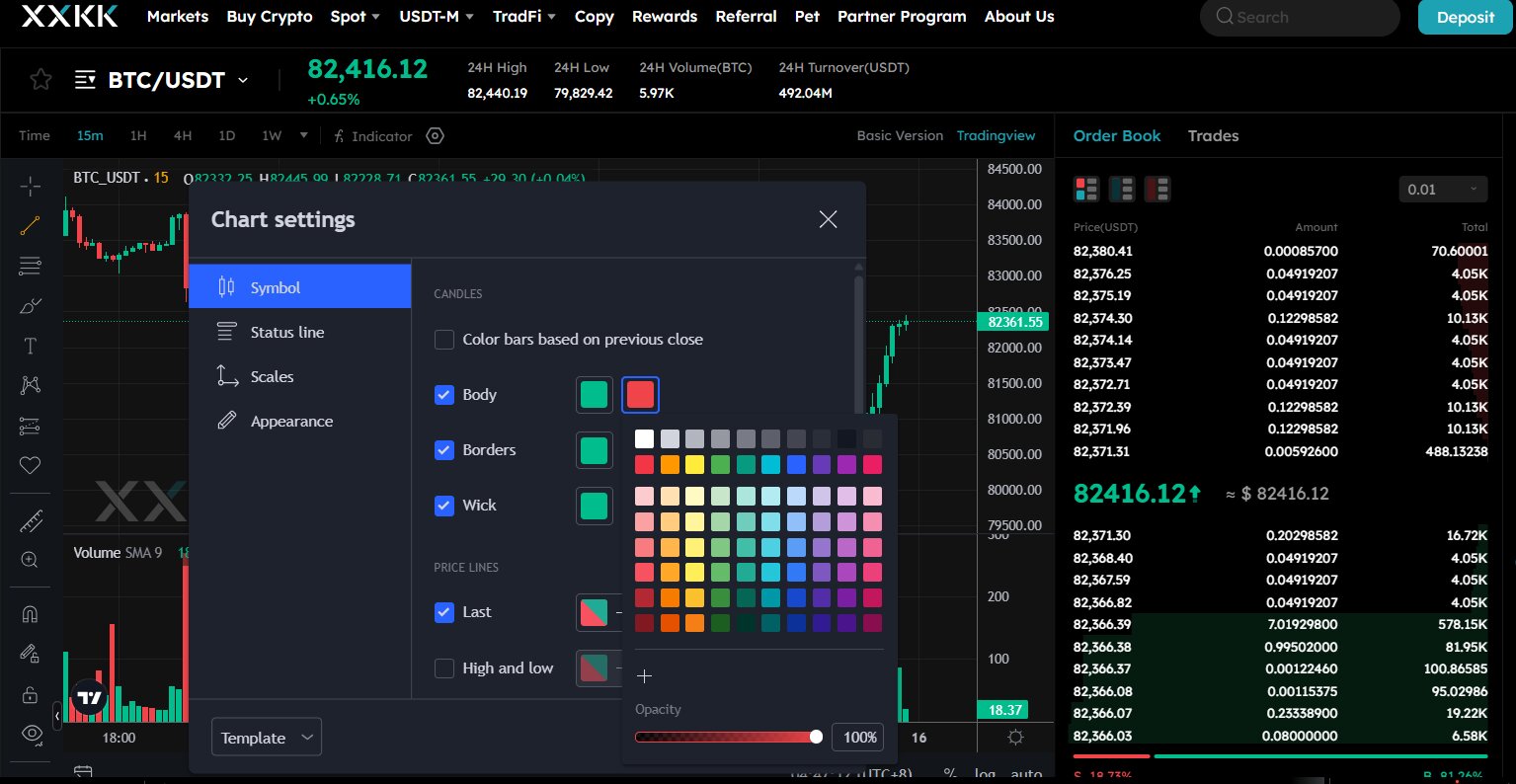 Source: XXKK Chart Settings
Many traders use green to indicate rising candles and red to indicate falling ones. Even though this kind of combination is well known and makes charts easy to read, other color combinations can be just as effective. Choosing the right up and down candle colors makes it easier to distinguish rising prices from falling prices and scan your chart quickly.
Here are three practical options to consider:
1. Green and Red
-
Up candles: Green
-
Down candles: Red
It is a favored option since the two colors can be easily told apart, which makes it easy to scan the chart for changes in price.
2. Teal and Orange
-
Up candles: Teal
-
Down candles: Orange
This setup provides an alternative to the usual green and red arrangement. It should be taken into account if you want a different appearance for your trading charts.
3. Blue and Magenta
-
Up candles: Blue
-
Down candles: Magenta
This is a more notable choice for traders who wish to move away from the traditional candle colors yet still have rising and falling candles remain visually distinct.
These color combinations are only starting points and not rigid rules. When you find it hard to tell certain colors apart, select shades that have strong contrast and check them using your chart background. The aim is to ensure that price movements can be easily recognized at a glance.
Hollow vs Filled Bodies: What Changes
Candlestick charts are often associated with hollow and filled candle types.
A candle that is filled has a solid body, while a candle that is hollow has an empty body, which allows the background to show through. The type of body displayed may also indicate the relationship between the opening and closing prices, according to the charting platform.
Hollow candles can be used to draw a further distinction in appearance, but their significance depends on the platform and the selected style. It is necessary to refer to the settings of the chart before giving them an interpretation.
If you'd like a simple arrangement, begin with solid bodies and use two distinct color shades to indicate direction. If you want more visual detail, then try hollow candles and make sure that the outlines are still visible at various zoom levels.
The best approach is not to depend solely on body fill if doing so makes the chart more difficult to read.
Wicks, Borders, and Grid Contrast
The candle bodies make up only part of the chart; the wicks and the borders must also be visible.
You could fail to notice the full price range indicated by a candle if the wick color blends with the background. Bright gridlines also compete with the price action.
For a cleaner chart:
-
When the platform supports it, match the wick color to the candle direction that corresponds to it.
-
For hollow candles, use visible borders.
-
Select grid lines that are subtle and do not dominate the candles.
-
Ensure that the background contrasts with the colors of the candles.
-
Make sure that the text, the price labels, and the volume bars are legible.
Check your setup over both short and long timeframes since a color scheme that appears clear on a large chart can become hard to distinguish when a lot of candles are on the screen.
Applying and Saving the Layout
If you want to change chart colors, just open the trading chart and look for any settings concerning appearance, symbol style, or candlestick configuration.
The range of controls varies from one charting interface to another, so do not assume that all platforms have the same menu names.
Use this checklist when setting up your chart:
-
Use a background that is different from the color of your candle.
-
Assign separate colors to candles that are rising and those that are falling.
-
Where available, adjust the wick and border colors.
-
Check the gridlines, the labels, and the volume bars.
-
Try the layout with another time frame.
-
If the platform provides the option, save the layout or template.
Open XXKK Markets to access available market charts and look at the chart settings provided in your interface.
Before moving to a new time frame, apply the candle colors that you have chosen, then save the layout in order that the settings will be available after a refresh if this feature is supported.
Why Chart Settings Reset
The colors shown in the chart could change each time the page is refreshed, after you have logged out, when switching to a different browser or following an app update. This might be due to settings that have not been saved, the use of a temporary chart layout, browser data having been cleared, or preferences being stored separately for different devices.
If the colors have disappeared, then reopen the chart settings and see if the layout has been saved. Make sure to look for any option to save a template or to set the current settings as the default.
Make sure that you're still using the same account, browser, or device as earlier. Chart preferences do not always transfer between devices, browsers, or app versions.
If the settings keep on resetting, then you should consult the help resources available from the platform or get in touch with support for advice.
Conclusion
The candlestick colors that are most suitable for trading are those that make it easy to tell the difference between upward and downward movements without distracting you from the price action. Use two colors that contrast with each other, ensure that the wicks and the borders are visible and keep the grid faint.
To open an XXKK account and establish a chart layout according to your requirements, you should test the colors on different timeframes and save the layout where the platform allows you to do so.
FAQs
What are the best candlestick colors for trading?
Green and red are a usual starting point, but teal and orange or blue and magenta could also be used. You should select colors that clearly contrast with one another and with the background of your chart.
Can I set different colors for up and down candles?
Most platforms that produce charts provide different colors for candles that are going up and those that are going down. To find out what options are available, you should look at how the chart appears or at the candlestick settings.
What is the difference between hollow and filled candles?
Filled candles have solid bodies, while hollow candles have unfilled bodies. Their exact interpretation depends on the platform and chart style, so check the chart settings before using them.
Why did my chart colors reset?
It might be that your layout wasn't saved, the browser data has been deleted, or that the platform stores its preferences separately on different devices. Be sure to check the save options and confirm whether your settings sync between sessions.
