Where to See Trade History on a Crypto Exchange
Where to See Trade History on a Crypto Exchange
Where to see trade history? It is not the same as order or transaction history. Here is where each one lives, and what to export when you need proof.
Quick Answer
Log into your crypto exchange and search for your trading records or the trades you have made. To check the orders you have submitted, refer to the order history, and to track your deposits, withdrawals, and transfers, check the transaction history. When available, use the date and trading pair filters and export the records.
Key Takeaways:
Trade history records completed executions.
Understand how order history helps you investigate open, canceled, or partially filled orders.
Learn how transaction history tracks deposits, withdrawals and other account movements.
Understand different export options available for your tax report.
Keep regular records for tax reporting and quote the order ID when contacting support.
Finding your old crypto trade should be simple, but frustration sets in when you need the records for tax purposes, for accounting, or to make a support request and find it difficult to find the correct page.
Most cryptocurrency exchanges maintain separate records for finished trades, orders that have been submitted, and account transactions. Understanding the difference between them will enable you to locate the information you are looking for without going through the irrelevant records.
This guide shows how to view trade history, explains how to find your order and transaction records and tells you how to export your data for future use.
Three Records That Are Not the Same
Before carrying out the search on your account, you should first understand these three types of records.
Trade History: This is the record of trades that have been carried out and typically contains the trading pair, the execution price, the quantity, the time and the relevant trading fees. In the case of an order that is filled in several parts, the trade history could show a number of separate executions.
Order History: The order history contains the record of all the orders you have submitted, including those that have been filled, partially filled, canceled, rejected, or expired, according to the exchange. It enables you to find out what happened to an order even if no trade was carried out.
Transaction History: This record usually includes the movements of assets into, out of, or within your account and may also cover deposits, withdrawals, transfers and records relating to fees.
The records have various uses. When you need to prove that a trade has been completed, check the trade history. If you want to investigate an order which has not been filled, then check the order history. If you are tracing a deposit or a withdrawal, look at the transaction history.
The names of the menu items differ from one crypto exchange to another and also between mobile applications; in addition, exchanges tend to update their interfaces, so always make sure that your crypto exchange app is updated regularly.
Finding Your Trade History
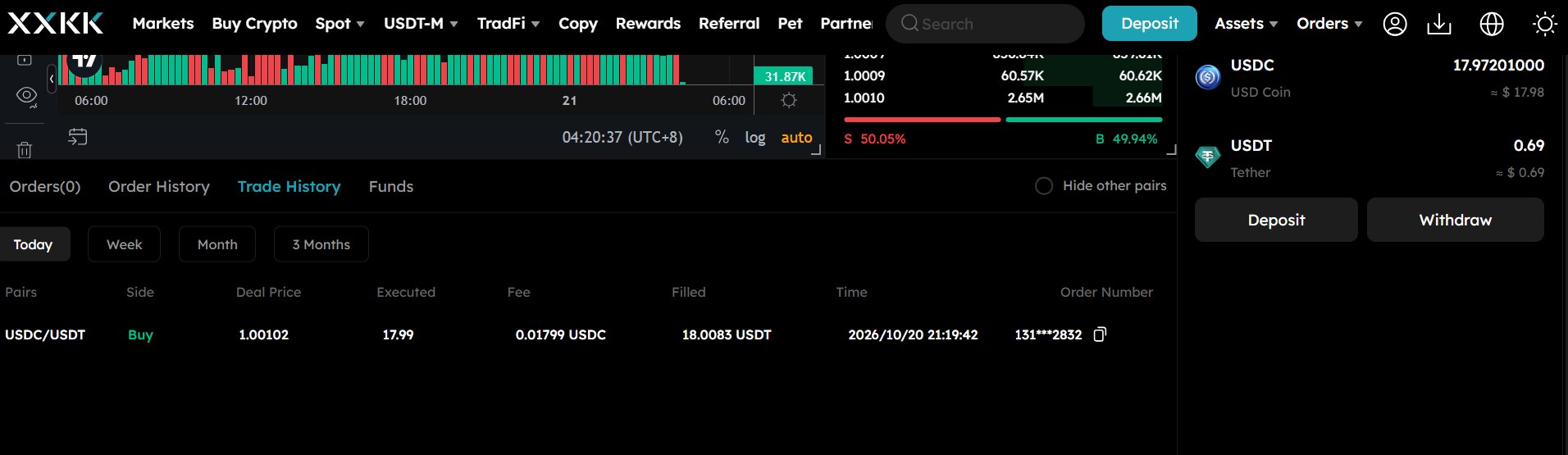 Source: XXKK Trade History Page
To find your trading history, you should log in to your exchange account and look in the part of the site that deals with trading records, executed trades, or account activity.
Once you locate it, use the available filters to narrow your search. Useful filters often include:
A trading pair, for example BTC/USDT.
Date range.
Buy or sell direction.
For example, the market type, such as spot or derivatives market.
The trade status or execution details, if available.
When you want to find a specific Bitcoin purchase, for instance, choose the appropriate pair and approximate date. Look at the execution time, price, quantity and fee in order to spot the right record.
It should be noted that a single order doesn't necessarily result in a single trade; a big order could match with several orders and therefore lead to multiple executions. To link them together, you should look at the individual trade records and any order ID that is available.
If you are unsure where to see trade history, look for the exchange order history or trade records section. You can review completed trades, execution prices, fees and timestamps from that section.
You can explore XXKK Markets to identify the market you traded, then look for the trading records available in your XXKK account interface.
Finding Your Order History
The best place to look after you place an order is your order history.
Imagine that you have place a limit order to buy some Bitcoin but the balance you see doesn't match the amount you expected. The order might still be open, only partly filled, or it might have been canceled. By looking at your order history you can find out the current status of it.
Look for information such as:
Order ID.
The type of order and the trading pair.
Requested quantity and price.
Executed quantity.
Remaining quantity, if displayed.
Order status and timestamps.
An order that is only partly filled should be given special attention since only part of the requested amount may have traded, the rest remaining open or being canceled later.
When contacting customer support regarding a missing or incomplete trade, make sure to provide the order ID, the trading pair, the approximate time, and a clear explanation of the problem. Giving them this information will enable the support team to locate the correct record.
Finding Deposits, Withdrawals, and Fees
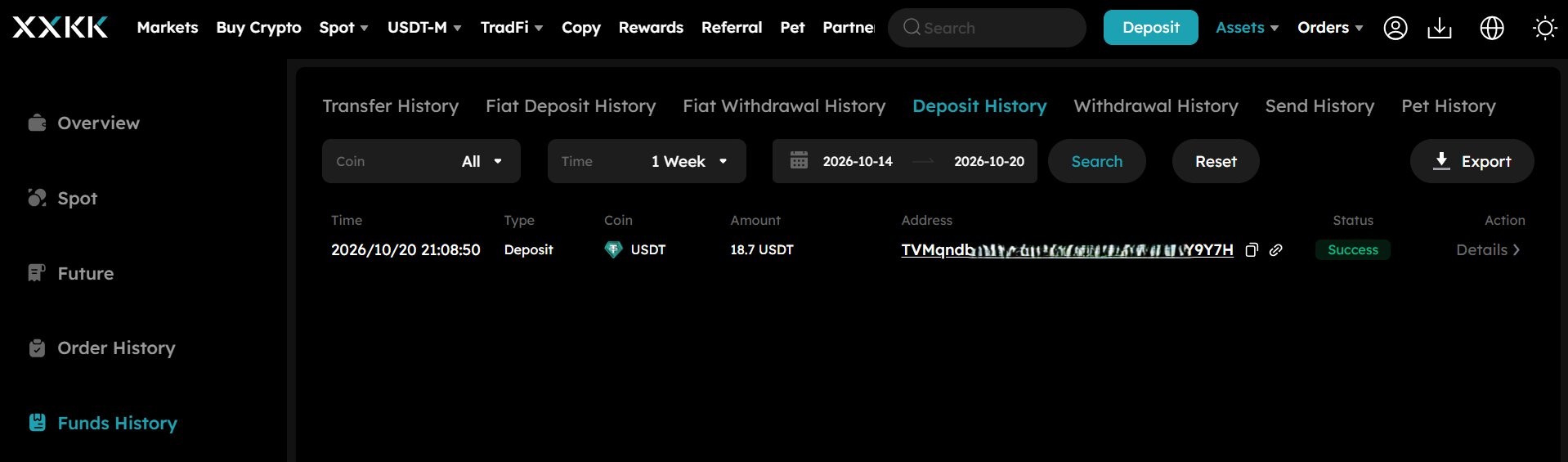 Source: Fund History Page
It doesn't follow that the trade history will show all the movements of money in your account, since deposits, withdrawals, and internal transfers are generally listed in the transaction or funding records.
When making a deposit, check the amount, the asset, the timestamp, the status, and the transaction hash if it has been given. For a withdrawal, look at the destination address, the network, the amount, the fee, and the withdrawal status.
When matching up account balances, attention should also be paid to fees. The trading fees could be given together with the individual executions or may be displayed in a separate account ledger. In the same way, the other charges will each have their own records.
The document on Transaction Fee Collection Time from XXKK Academy contains further details regarding when transaction fees are charged.
In an investigation of a discrepancy in the balance, rather than depending on a single history page, you should compare the relevant trade records with the deposits, withdrawals, transfers, and fees.
Exporting Records for Tax or Support
Although many exchanges offer the possibility of downloading trading or account records, the available formats (PDF, CSV, Mail), the date ranges, and the export options differ.
To export trade history, look in the relevant records section for a download, export, or report feature. CSV files are useful for use with spreadsheets and accounting software, whereas PDF reports may be appropriate for reviewing or sharing the records when they are available.
Before you export the data, make sure that the date range and the type of record are correctly specified; you may end up having to create separate files for spot trades, derivatives, deposits, withdrawals, and fees.
If you are handling tax or accounting issues, it is advisable to retain the original exports and keep records which show the cost of the assets, the proceeds from the sale, the times at which the transactions took place, and the fees involved. As tax rules differ from one jurisdiction to another, you should verify what your local requirements are.
You shouldn't wait until the filing deadline to collect all the documents you need; rather, you should export your records from your crypto exchange at the end of each tax period, store them safely, and ensure that the files contain the necessary dates.
If you are filing a support ticket, be sure to include the right order ID or transaction reference. Give only the information that is necessary for investigating the issue and never supply your password or authentication codes.
Why a Trade Might Not Appear
When you have a missing trade record, it does not always mean something went wrong. Check these common causes first:
Your order may not be executed if an open or canceled order have no completed trade.
The order was only partly filled: the part that had been executed is shown as completed trading activity.
You have chosen the incorrect market since the spot and derivatives figures are shown separately.
The trade has been excluded by your filters: perhaps the date range, trading pair, or the chosen account is wrong.
The interface has changed due to a new version of the exchange and the record has been moved to a different section in the current version.
Different records have different functions - a deposit or internal transfer might appear in transaction history rather than trade history.
If the trade is still missing, note the approximate time, the trading pair, the order ID if it is available, and any relevant screenshots. Then get in touch with the official support team through the support channel that is available for further investigation.
Conclusion
The different parts of your account record are provided by the trade history, the order history and the transaction history. Start with the section that corresponds to the task you have, apply the appropriate filters, and then check the order ID or transaction reference when looking into a particular event.
For tax and accounting purposes, continue to keep the exports and store the original files securely. Following a regular record-keeping procedure will make it easier to reconcile the balances and deal with support issues.
Open an XXKK account to keep your trading records together, and review your available export options regularly.
FAQs
Where do I find my trade history?
Log into your crypto exchange and search for your trading records, the trades that have been executed, or any activity relating to your account. Use the trading pair and the date to filter and locate the transaction you are looking for. The names of the menu items differ from platform to platform and between app versions.
What is the difference between order history and trade history?
The order history includes the orders that have been submitted together with their status, while the trade history shows the executions that occurred. A single order can result in several trades, and an order which has not been filled may not have any trade record.
How far back does trade history go?
The history that is available will vary according to the exchange, the type of market, the account interface, and the export options. Make sure to check the date filters and the reporting tools; if historical records are not available, you should contact support to find out about accessing historical data.
Can I export my trade history?
A large number of exchange platforms provide downloadable reports, usually in CSV or some other format that is accepted. You should look at the export options that are available, choose the right date range, and make sure that the records you download include the trades and fees that you require.
